The TrackMan Golf app can't export swing video.
Here's what to ask your studio for: a stroke file with the swing video embedded, or a shared report that opens in a browser. The stroke file is the import MotionEdge uses when you want the video and the launch data together.
Updated October 6, 2026
Which TrackMan app are you using?
- TrackMan Golf: the consumer app for your account and activity history. Start with finding your session.
- TrackMan Golf Pro: the iPhone and iPad app used with TrackMan 4 for shot analysis. Start with sharing a report.
- TrackMan Performance Studio (TPS): the Windows software at many studios. Use it for a stroke-file export. That file is the one with the video embedded.
TrackMan explains the distinction in its Golf versus Golf Pro guide.
Ask the studio. The Golf app will not hand you the video.
Open Activities and find the session on the account you played under. That history is useful. It is not the file MotionEdge imports.
Ask the studio for a stroke file (.tms). The swing video is embedded in that file with the launch-monitor data. A shared report that includes the videos is the other way to bring the same session home.
The TrackMan Portal also provides access to account activities and PDF reports. A PDF is useful for reading or printing, but MotionEdge does not import it as swing data. Copying the Portal address or an activity link is not the same as copying a supported report link.
A TrackMan Range activity does not guarantee recorded swing video or the same club data as a studio session. Check what your session contains before choosing an export.
Official references: Golf app FAQ and TrackMan cloud synchronization.
Create a report in TrackMan Golf Pro.
Golf Pro supports report sharing on iPad and, from version 4.3, on iPhone. Older advice that reports require a Windows computer is out of date.
- In an active Shot Analysis session, open the view selector and choose Share for a report containing multiple groups. Record at least one shot first.
- For one shot, press and hold the shot in the shot list. For one group, press and hold the group.
- Choose the report content, check the recipient, and send it. TrackMan delivers a link by email.
On iPad, you can also open Shot History, choose a previous session, and use the share control. TrackMan’s iPad report instructions and Golf Pro 4.3 release notes show the controls.
Spot a link MotionEdge can import. Open it in a browser. The address starts with web-dynamic-reports.trackmangolf.com and includes r= plus the report ID. A link that opens the TrackMan app, asks you to sign in, or downloads a PDF is a different kind of link.
Export a stroke file from Performance Studio.
In TPS, open the session in Shot Analysis, select the shots, and choose Stroke File (.tms). That file is the one with the video embedded. The step-by-step, including transfer to your phone, is in the stroke-file guide.
For an emailed link instead of a file, use TPS’s Report workflow, select the shots or club groups, and check the preview for videos. See how to create a report for the upload step and software-subscription requirement.
Bring the session into MotionEdge.
On iPhone or iPad, which is where most people start:
- Open MotionEdge and stay on Home.
- Tap Import.
- Tap TrackMan (.tms) and choose the file in Files. Or tap TrackMan Report and paste the link.
- Check the preview, leave the swings you want selected, and tap Import.
- Open a swing and choose TrackMan Data on a review panel.
The same two commands are in the More menu on Sessions and on All Swings. On Mac, use Home → Import and choose the file or the report.
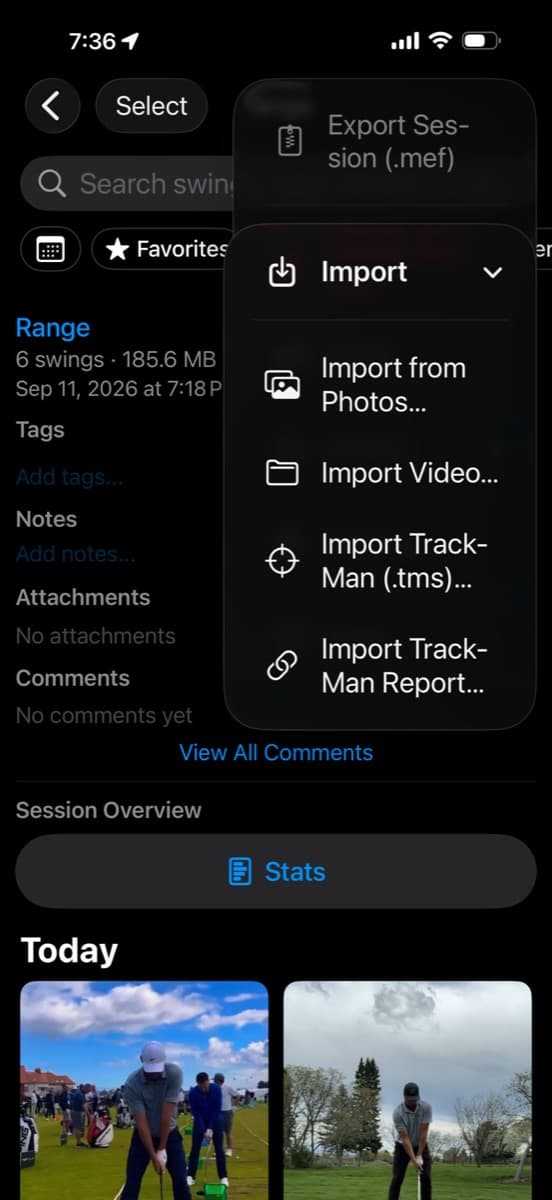
The stroke file is the import that carries the video. If the preview has fewer shots or camera angles than you recorded, ask the studio to include them and export again.
Review your next session.
MotionEdge is a golf swing analysis app for iPhone, iPad, and Mac. TrackMan import, live connection, and the AI Coach are part of MotionEdge Pro. A 7-day free trial turns them on.


Independent MotionEdge guide. TrackMan is a trademark of TrackMan A/S; no endorsement is implied.