Practice That Finally Counts.
Your AI golf coach grades every swing and coaches you like a pro who's seen every session.


Free plan includedPremium AI Coaching free for 7 days
- Your whole swing analyzed on device, synced via iCloud
- Native apps for iPhone, iPad, and Mac
AI Coach
Knows your swing. Remembers your history.
Ask why you're losing it right, coming over the top, or struggling with contact. Every answer is based on your swing—not generic golf advice. Coaching is grounded in peer-reviewed golf-biomechanics research and the same fundamentals taught by the game's best instructors.
Every recommendation explains what's happening, why it matters, and the best drill to practice next. Every swing, metric, and TrackMan number carries across sessions, so every recommendation is based on your swing history—not just your latest video.
The library it draws from is free to read. Early loss of lag, early extension, over the top. Coach's Corner
Golf swing analyzer
Capture every swing. Analyzed before the next ball.
Lean your phone against your golf bag or clip it to a tripod. MotionEdge captures, analyzes and grades every swing automatically — no buttons, no waiting, no missed swings. By the time you've teed up the next one, it's already graded and waiting.
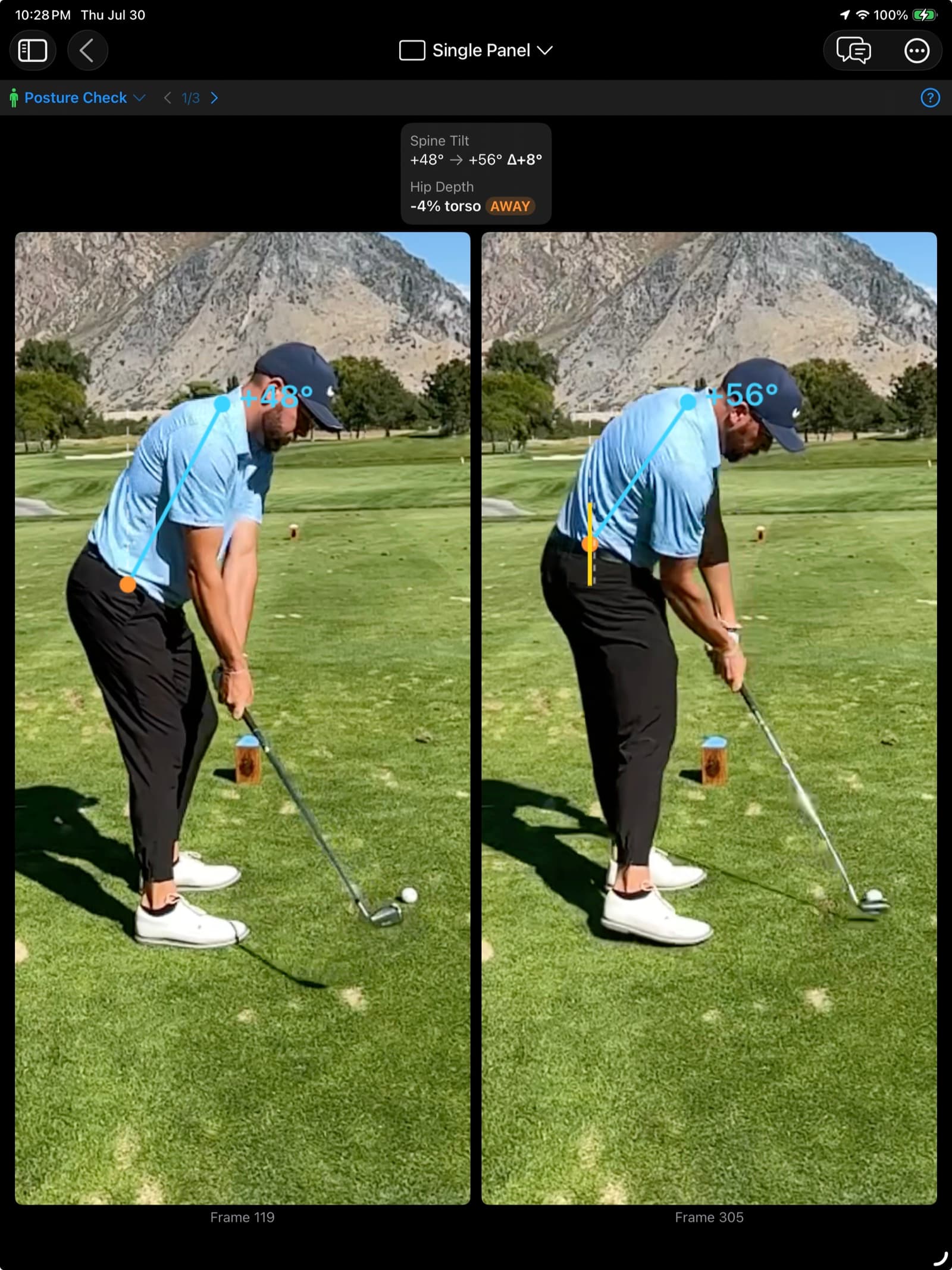
Every swing gets posture grading, hand-path analysis, Shaft Check, a 10-position filmstrip, joint overlays and multi-swing comparison — all processed on your device, all free. No uploads, no queues, and no signal required, which matters at a range with one bar.
Spine tilt +50° at setup, +57° at impact — a +7° delta. Hip depth 5% of torso away from the ball. Posture held.
Five ways to catch a swing · up to 4 cameras at once · up to 240 fps · Fast-Shutter Mode caps the shutter at 1/250s
Your swing studio.
On Mac, build the workspace you want. Compare swings side by side, chat with your coach, browse your library, and review pose overlays—all at the same time.
Four windows open at once on a Mac — compare, review, browse and coach, side by side.
Pricing
A whole season of coaching for the price of one lesson.
A one-hour lesson with a PGA pro runs $100–$150, once.
Free
Keeps working$0
- Automatic swing capture and grading
- 10 positions, posture and hand path
- Shaft Check — the club on your frames
- Filmstrip, comparison and drawing tools
- Apple Watch capture
- Up to 25 saved swings
Pro
7 days free$79.99/year, or$9.99/month
Less than one $100–$150 lesson — for the whole season.
- Everything in Free, without the cap
- The AI Coach — ask, get the fix, it remembers
- TrackMan import and live connect
- Remote camera, up to 4 at once
- Sync across iPhone, iPad and Mac via iCloud, and share with your coach
Not a replacement for a great teacher. It's the coach in your pocket between lessons, always a tap away.
Extended analysis
TrackMan and Apple Watch integration.
If you wear an Apple Watch or have access to a TrackMan, you get more to work with. MotionEdge puts those numbers beside the video, in the same review.
- TrackMan. Your swing video and launch numbers side by side. Import a file, paste a report link, or connect live. Your AI Coach reads both together.
- Apple Watch. Hands-free capture, instant tempo feedback, and haptic rhythm training, even with your phone in the bag.
Common questions.
What does the AI do on my device?
Finds the 10 key swing positions, grades your posture and hand path, and lines up frames for comparison — computed on your phone, offline at the range.
Read the full answer →What does Apple Watch do?
Triggers capture when you swing, remote-controls your camera, and measures your swing tempo.
Read the full answer →Does it work with TrackMan?
Connect live, or import TrackMan reports and session files. Your AI Coach reads the launch data alongside your video.
Read the full answer →Can I share my swings with a coach?
Yes. Put sessions in a collection and text your coach or playing partner an invite from the share sheet. Your swings sync across iPhone, iPad and Mac via iCloud. Sharing and sync are part of Pro.
Read the full answer →Can I import videos from other apps?
Import from Camera Roll, slow-motion clips, or any video source.
Read the full answer →How much AI coaching do I get?
Your subscription includes a monthly allowance of swing reviews and coaching conversations. Settings shows what's left, and you can add a Coach Pack that stays good for a year.
Read the full answer →
From the founder
You can't fix what you can't see.
Behind every good swing is a body doing the same few things right: holding its posture, shallowing the club, clearing the hips in the right order. I've spent years reading TrackMan numbers, and they always trace back to one of those.
Without that feedback you're guessing. You hit a bucket, a few feel good, and nothing actually changes. That isn't practice — it's repetition. That's why I founded MotionEdge.
MotionEdge reads the cause instead: posture, hand path, whether your spine angle holds. After every swing, you know exactly what to fix — before you hit the next one. Now every rep moves you forward.
Dwain KinghornFounder · TrackMan Certified Professional, Level 2
Five years running Alta View Golf · 1,000+ one-on-one sessions
Questions? support@motionedge.ai
Make the next range session the one that counts.
Download MotionEdge and grade your first swing today. The free plan keeps working, and Pro is free for 7 days whenever you want the AI Coach.