Analyze your TrackMan session with swing video at home.
Bring the swing you hit at the club into MotionEdge. Posture grading, Shaft Check, and the AI Coach sit with the launch-monitor numbers, so you see how your body and shaft line up with that ball flight.
Guides by Dwain Kinghorn, TrackMan Certified Professional, Level 2.
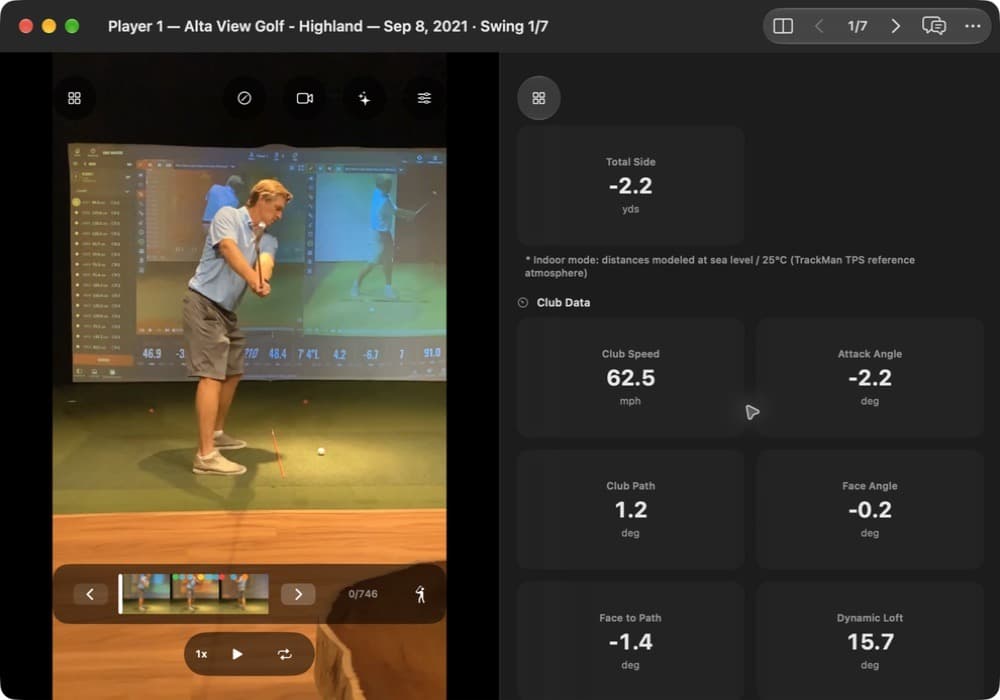
Two views the TrackMan screen does not draw.
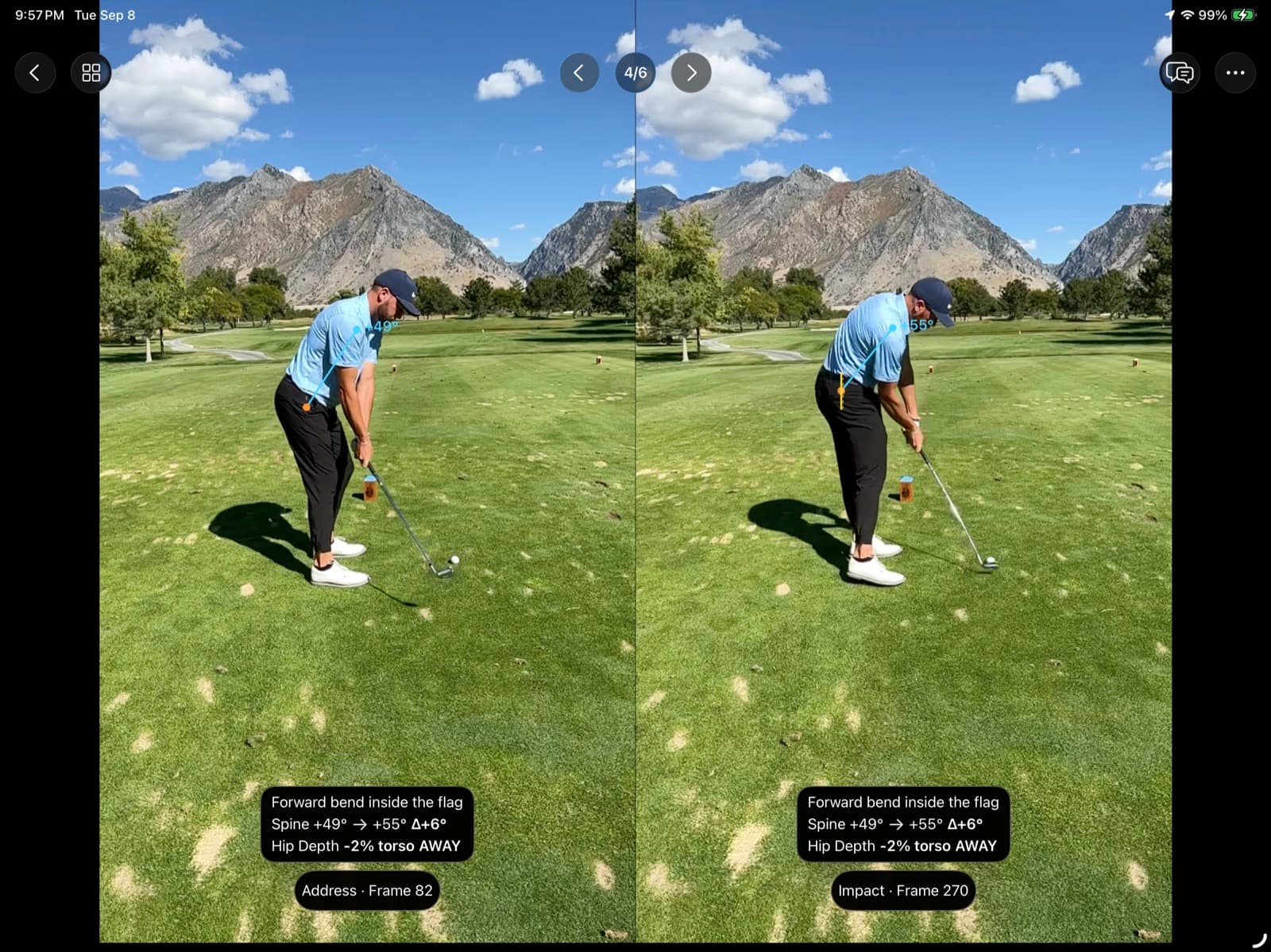
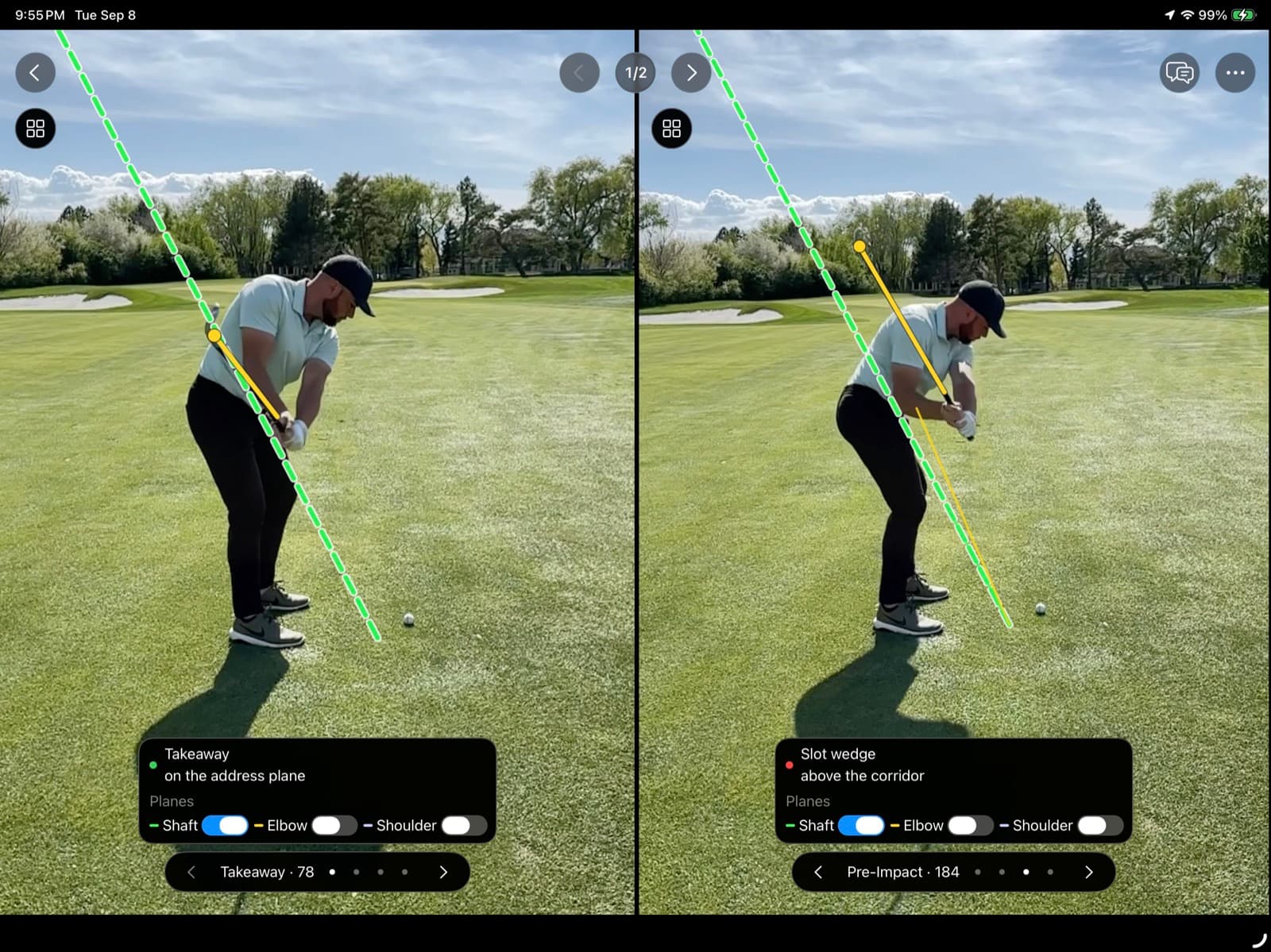
Posture grading colors the positions from address through finish, so you can see what the body did on that video. Shaft Check draws the club on the frames, from setup through impact, so you can set that line next to the path number.
Which TrackMan do you have?
The route depends on the software in front of you. A TrackMan iO at home follows the software on that unit, usually a stroke file, a report, or a live connection. It does not use the consumer Golf app.
| Your setup | How it comes in | Video | Shot Trajectory |
|---|---|---|---|
| Studio with Performance Studio | Stroke file, or a shared report | Yes, when the recording is in the file or report | A report can include it. A stroke file does not. |
| TrackMan 4 you own, Golf Pro on iPhone or iPad | Shared report, or a live connection on your network | The report brings its videos. Live uses your MotionEdge camera. | A report or a live shot can include it. |
| Consumer TrackMan Golf app | The app does not export swing video. Ask the studio for a file or a report. | Only what that file or report includes | Follows the file or report you receive |
| TrackMan Range | Ask whether that visit recorded video and club data | Not guaranteed | Not guaranteed |
| A lesson with a coach | Ask for a stroke file or a shared report with the videos | When the coach includes the recordings | A report can include it. A stroke file does not. |
Analyze your TrackMan session at home.
For a lot of golfers, TrackMan is the console at an indoor club, or the unit a coach uses in a lesson. It stays there when you leave. Before you go, save a shared report link or a stroke file. A few swings from the session are enough. Now you can fully analyze your swing after your TrackMan session on your own iPhone, iPad, or Mac.
On your iPhone, iPad, or Mac, you open those swings when you want and keep a library of practice sessions. Posture grading, the AI Coach, and the launch-monitor numbers are available in the MotionEdge app so you can see how your body and shaft motions generate the resulting launch conditions.
What that motion does to the numbers.
An over-the-top shaft pattern lines up with an inconsistent club path. Shaft Check draws the shaft on the swing, and the path number is on that same swing. The sample above is a slower 7-iron with club path +1.2°, a small in-to-out reading, not an over-the-top example. Early hip extension lines up with attack angle and low point that vary from shot to shot. The posture grade names what the body did. TrackMan names what the clubhead and the ball did.
Above the address plane late is generally an out-to-in path. Well under the address plane is generally an in-to-out path. Two or three swings side by side, with the Shaft Check line and the club path on each, is how you see whether that pattern holds in your own session.
Record the video with TrackMan cameras.
While you are in your TrackMan session, use the TrackMan camera app to add video to the TrackMan swings. When you export the swing to a report or a stroke file, it has both the video and the launch-monitor data. MotionEdge analyzes the video imported from TrackMan the same way it analyzes any other video you record locally or import from a file.
Use the stroke file when you want that video embedded with the numbers. A CSV is a spreadsheet of the numbers. It does not bring the swing video, so MotionEdge does not import it.
Get your session in.
Get more from it.
Common questions.
Which TrackMan setup can I bring into MotionEdge?
A Performance Studio stroke file or shared report, a Golf Pro report from a TrackMan 4 you own, or a live connection on the same network as your unit. The consumer TrackMan Golf app does not export swing video. Ask the studio or your coach for the file or the report.
Does a stroke file include Shot Trajectory?
No. A stroke file brings the videos and the TrackMan numbers. Shot Trajectory, the drawn 3D flight, comes from a shared report or a live shot when that shot includes a flight path.
Why a stroke file instead of a CSV?
The stroke file has the swing video embedded with the launch data. A CSV is a spreadsheet of numbers and does not bring the video, so MotionEdge does not import it.
Can I try TrackMan import before I pay?
TrackMan import and the AI Coach are part of MotionEdge Pro. A 7-day free trial turns them on. Import a stroke file or a shared report, then open a swing with the video and the numbers together.
Review it on iPhone, iPad, or Mac.
TrackMan import and the AI Coach are part of MotionEdge Pro. A 7-day free trial turns them on.


Independent guides by MotionEdge. TrackMan is a trademark of TrackMan A/S; no endorsement is implied.