TrackMan numbers explained, beside your swing.
Start with the shot you wanted, then read the delivery that produced it. These seven numbers answer different questions; none is a complete swing diagnosis.
By Dwain Kinghorn · TrackMan Certified Professional, Level 2 · Updated October 6, 2026
A real shot, not a target to copy.
This studio stroke file was imported into MotionEdge on Mac. It is a September 8, 2021 sample labeled a 7-iron, and the club speed is 62.5 mph, slower than a typical adult iron. The screenshot pairs the recorded video with that shot’s club-delivery data. A file label alone does not verify the club actually used.
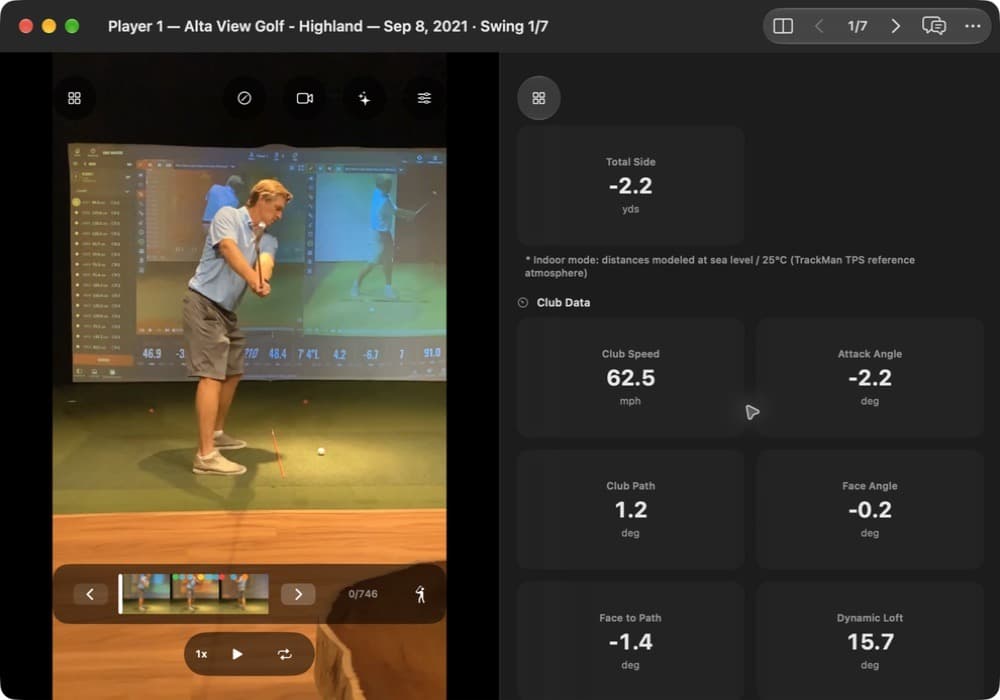
- Club path
- +1.2°
- Face angle
- −0.2°
- Face to path
- −1.4°
- Attack angle
- −2.2°
- Dynamic loft
- 15.7°
- Club speed
- 62.5 mph
These are the imported values, not recommended targets. Before comparing sessions, check the club label, units, target line, strike location, and whether distance is measured or modeled.
Club path: where the club is moving.
Club path is the horizontal direction of the clubhead at impact relative to the target line. Positive means right; negative means left, regardless of whether you play right- or left-handed.
Here, +1.2° means the club was moving right of the target. It does not tell you where the face pointed, nor describe the entire downswing. Use a consistent down-the-line camera view to compare movement across shots, not to calculate this angle from a shaft line.
TrackMan’s club path definition.
Face angle: where the face is pointing.
Face angle describes the face’s horizontal orientation at impact relative to the target. In this shot, −0.2° means slightly left. This is different from face to path, which uses the club’s direction as its reference.
Face orientation is a major influence on launch direction, but it is not the only one. An ordinary swing video rarely resolves face orientation precisely during contact. Read the launch-monitor value rather than guessing a fraction of a degree from a blurred frame.
TrackMan’s club-data definitions explain the impact location used for these measurements.
Face to path: the face relative to delivery.
Subtract club path from face angle. Here, −0.2° − (+1.2°) = −1.4°. The face points left of the path. For a right-handed golfer, that is closed to the path.
With centered contact, this relationship suggests leftward curvature. Off-center contact, especially with a driver, can change that expectation through gear effect. Check the strike and spin axis before blaming one swing movement.
Zero face to path does not mean a shot started at the target: the face and path could both point well right or left. TrackMan explains face to path.
Attack angle: up or down at impact.
Attack angle is the vertical direction of clubhead travel at impact. Negative means downward; positive means upward. This shot’s −2.2° indicates a descending delivery.
That does not by itself prove clean ball-first contact. Read it with strike quality and low point. The useful delivery depends on the club and shot: a teed driver and an iron from turf ask different questions.
TrackMan’s attack angle explanation.
Dynamic loft: the loft delivered.
Dynamic loft describes the vertical orientation of the face at the contact point during impact. It differs from the static loft stamped on the club. This shot’s imported value is 15.7°.
Face-on video gives context for how you delivered the club. It cannot isolate every influence, including shaft bending and contact location. Compare dynamic loft with launch and strike before deciding that more or less is better.
TrackMan’s dynamic loft explanation.
Spin loft: loft relative to clubhead travel.
Spin loft is a three-dimensional angle between the face orientation and the clubhead’s direction of travel. Dynamic loft minus attack angle is a useful approximation, not the full definition.
For the values above, the two-dimensional subtraction is 15.7° − (−2.2°) = 17.9°. That is a calculated illustration, not a replacement for TrackMan’s spin-loft reading. Horizontal angles also matter.
Do not turn spin loft into a universal “compress it more” target. Spin also depends on speed, friction, and where the ball meets the face. TrackMan’s spin loft explanation.
Low point: where the arc bottoms out.
Low point describes how far the bottom of the clubhead’s arc is before or after impact. A descending strike has its low point after impact; an ascending strike has it before impact.
No low-point tile is visible in this capture, so there is no distance to read from it. Do not infer an exact distance from attack angle alone. For an iron, combine the recorded value, when available, with evidence of turf contact and a clear view of the strike.
TrackMan’s low point explanation.
Read a pattern before choosing a change.
- Choose a shot goal: starting line, curve, carry, or contact.
- Compare several shots with the same club and setup. Keep the misses in view.
- Use the relevant numbers to describe the delivery, then review video for a repeatable difference.
- Test one change with your coach and check whether the intended shot improves.
The number describes what happened at impact. Video adds movement context; neither automatically proves the cause. See what radar and video can each tell you.
Review your next session.
MotionEdge is a golf swing analysis app for iPhone, iPad, and Mac. TrackMan import, live connection, and the AI Coach are part of MotionEdge Pro. A 7-day free trial turns them on.


Independent MotionEdge guide. TrackMan is a trademark of TrackMan A/S; no endorsement is implied.