TrackMan and video answer different swing questions.
TrackMan describes the shot and club delivery. Video lets you revisit the movement. Put them together to ask better questions about the same swing.
By Dwain Kinghorn · TrackMan Certified Professional, Level 2 · Updated October 6, 2026
Read the motion and the launch on the same swing.
A club-path reading describes delivery at impact. It does not describe the whole backswing or reveal why you delivered the club that way. Two golfers can reach similar impact numbers through visibly different movements.
TrackMan’s club-data definitions explain the points in the impact interval used for its measurements. That specificity matters: a launch-monitor number and a line drawn on an earlier video frame are not measuring the same thing.
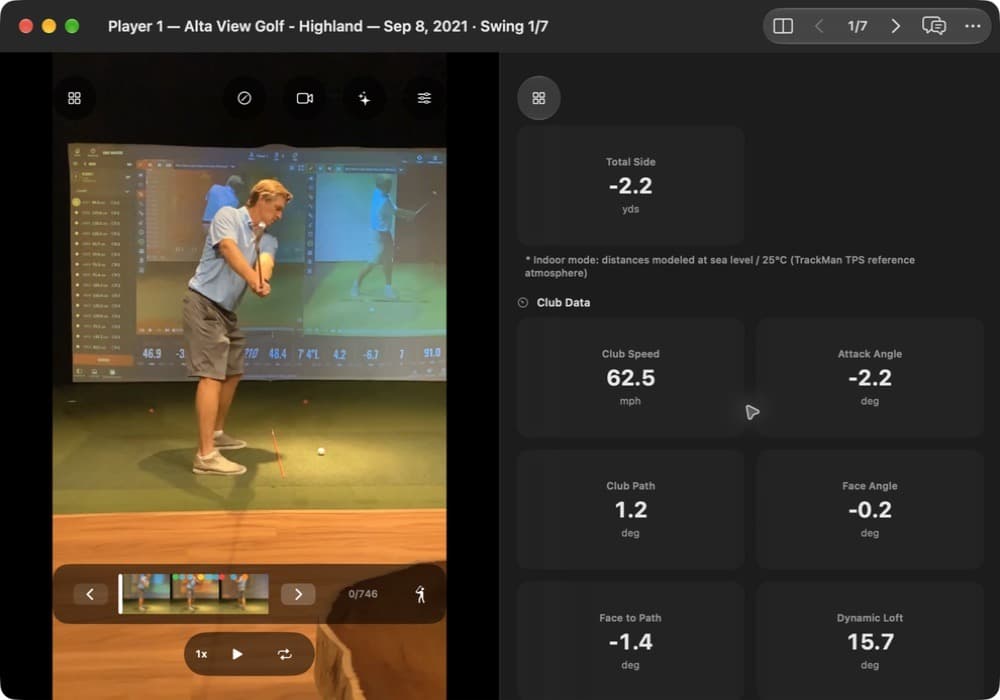
In this imported shot, the app reports club path +1.2° and face angle −0.2°. Those numbers describe delivery. The video is paused before impact, so the visible pose should not be treated as an impact measurement.
Use the right evidence for the question.
Start with TrackMan
- How fast did the ball leave?
- Which way did the club travel at impact?
- Where did the face point relative to that path?
- What launch, spin, and flight result were recorded?
Return to video
- For how fast the ball left: how large was the shoulder turn, how much did the wrist hinge, and how well did the lead leg post up early?
- For which way the club traveled at impact: check the clubhead with Shaft Check. Above the address plane late is generally an out-to-in path. Well under the address plane is generally an in-to-out path.
The available TrackMan parameters depend on the session and hardware. A ball-only export cannot supply missing club measurements. MotionEdge presents the data that came with the shot; it does not create missing radar readings from video.
A camera view also has limits.
One camera projects a three-dimensional movement onto a flat image. Changing camera position changes the appearance of alignment and angles. Compare like views, and use a second angle when a movement is hidden.
Frame rate, motion blur, and an obstructed body or club limit what you can judge. A face-on view does not reveal everything happening toward or away from the ball. Down-the-line does not reveal everything happening toward the target.
Video analysis and pose overlays give you movement context. They do not replace a launch monitor’s clubface, spin, or ball-speed measurements.
Match the shot before connecting the evidence.
- Describe the result. Start with the intended flight and the actual launch, curve, contact, or carry.
- Compare several shots. Look for a movement difference that repeats with the result, using the same camera setup.
- Test a change. Keep the club and task consistent, change one cue, and see whether both the pattern and the intended result change.
A repeating association is a lead to investigate, not proof of cause. Strike location, aim, equipment, and the intended shot can also explain a change in flight.
Keep modeled flight in context.
The screenshot includes an indoor-mode note: distances are modeled at the TrackMan TPS reference atmosphere. That is useful practice information, but it is not a measurement of how far the ball flew outdoors that day.
In MotionEdge, TrackMan Data contains the available numbers. Shot Trajectory is a separate panel that appears when a report or live shot supplies a usable flight path. Stroke-file imports provide the numbers without that trajectory panel.
See when Shot Trajectory is available and the club-delivery numbers guide.
Make the next review useful.
A session holds voice annotations and notes, and each swing has a note of its own. Save your observations. Over time they show the patterns that work for you. You can also record a voice-over screen recording and keep it in the session with those observations.
For your next booking, use the studio practice checklist to arrange video capture and the export before you start.
Review your next session.
MotionEdge is a golf swing analysis app for iPhone, iPad, and Mac. TrackMan import, live connection, and the AI Coach are part of MotionEdge Pro. A 7-day free trial turns them on.


Independent MotionEdge guide. TrackMan is a trademark of TrackMan A/S; no endorsement is implied.