Keep what you learned at a TrackMan studio.
The useful session is the one you can return to. Plan your recording and export before you hit, then leave with the shots behind the numbers.
By Dwain Kinghorn · TrackMan Certified Professional, Level 2 · Updated October 6, 2026
Before your booking, agree on the handoff.
Ask the studio whether your session includes recorded video and whether it can provide a TrackMan stroke file (.tms) or shared dynamic report. Confirm this before paying for a session whose main purpose is later video review.
A summary PDF or screenshot of averages can be useful, but neither contains the individual swing videos for MotionEdge import. TrackMan also documents a TPS software-subscription requirement for sending reports, so do not assume every bay offers the same export.
- Confirm which camera angles and club measurements will be recorded.
- Bring storage the studio accepts, or agree on a cloud transfer for a large stroke file.
- If you plan to connect MotionEdge live, ask the operator about the TrackMan model, network access, and session mode first.
Film a view you can compare.
If you use your phone, place it on a stable mount outside the swing area. Frame your whole body and the club’s travel. Keep camera height, distance, zoom, and alignment consistent when comparing shots.
Use face-on to review motion toward or away from the target and the delivery you can see from that side. Use down-the-line to review motion toward or away from the ball. A camera placed diagonally can make the same movement look different.
A separate phone video is not automatically paired with a later TPS export. To get automatic pairing while you hit, set up MotionEdge’s live connection and confirm it with a test shot. Otherwise, make sure the TrackMan export includes its recorded videos.
Practice one shot problem.
Pick a club, target, and question. “Can you start this iron closer to the intended line?” is more useful than trying to perfect every tile on the screen.
- Record a small baseline group before changing anything.
- Choose one cue with your coach and hit another group with the same club and target.
- Compare the pattern, including mishits. A best shot alone says little about reliability.
- Finish with a few shots without rehearsing the cue and see what remains.
Save a short note about the intended shot and cue. Numbers and video will not preserve what you were trying to feel.
Before leaving, save shots and check the result.
Option 1: a stroke file
Ask for a .tms of the shots you want, with the videos included. Keep the original until the import checks out. The steps live in one place: the stroke-file guide.
Option 2: an emailed report
Ask for a report containing the selected shots and videos. The sender should check the preview and upload missing media before sending. Open the received link while you are still at the facility. Follow the report creation guide.
Option 3: your live-captured session
Open a captured swing in MotionEdge and confirm both the video and TrackMan Data are present. A connected status alone does not prove the camera recorded or the shot contained the metrics you wanted.
At home, verify the import before analyzing.
On iPhone or iPad, open Home → Import. Choose TrackMan (.tms) or TrackMan Report, check the preview, and import the swings you want. Mac uses the same Import menu.
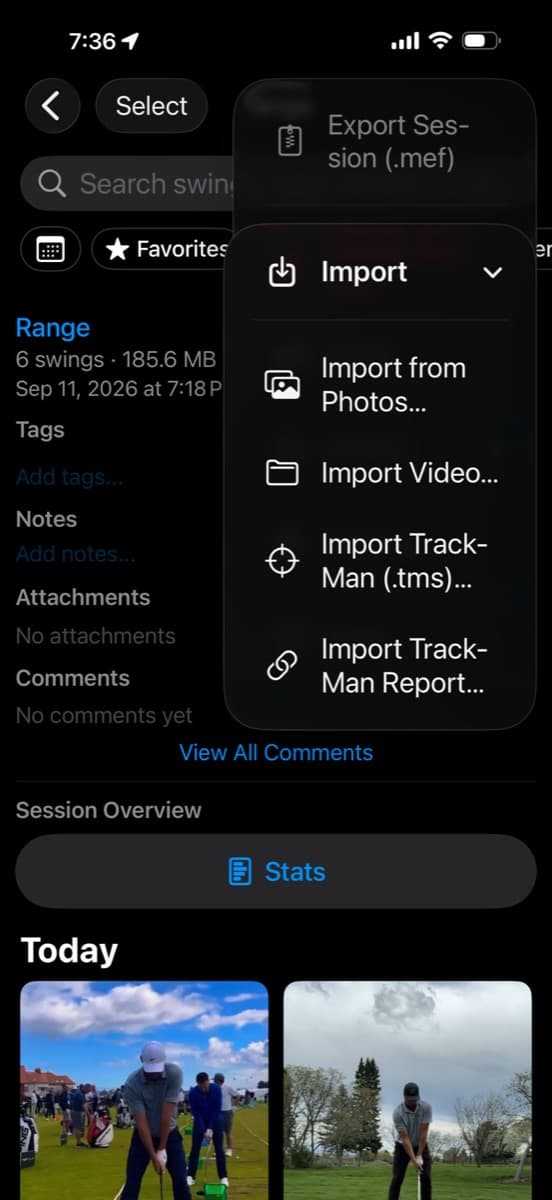
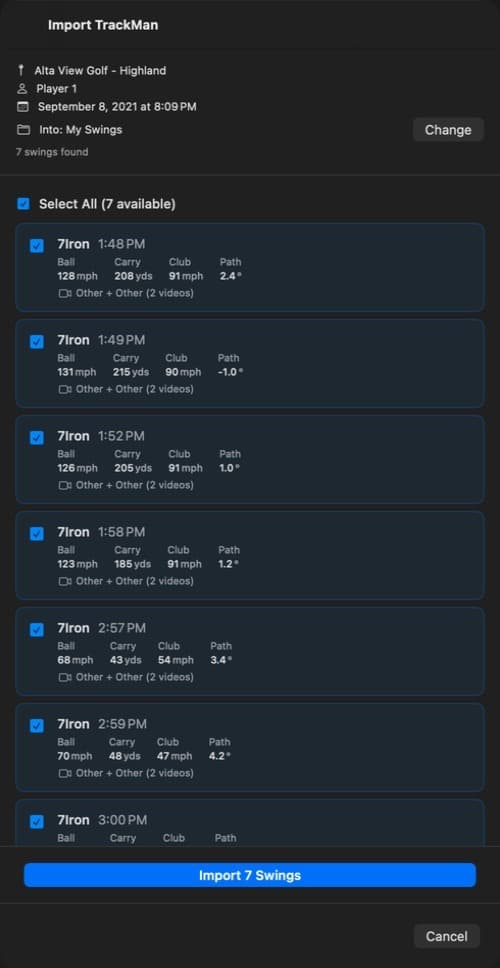
Open a swing, choose a video angle, and put TrackMan Data in another review panel. Read the club label and units before comparing it with a previous session. Indoor modeled distance deserves different treatment from measured outdoor flight.
Review the baseline and practice groups against the question you started with. The numbers guide explains which delivery measurements answer which questions.
Give your coach the session and the question.
An imported session can be exported as a MotionEdge .mef file. Include the club, target, cue, and shots you want to discuss. That gives your coach something more useful than an isolated launch-monitor average.
Official workflow reference: TrackMan’s report and screencast instructions.
Review your next session.
MotionEdge is a golf swing analysis app for iPhone, iPad, and Mac. TrackMan import, live connection, and the AI Coach are part of MotionEdge Pro. A 7-day free trial turns them on.


Independent MotionEdge guide. TrackMan is a trademark of TrackMan A/S; no endorsement is implied.